The idea in one sentence
When something happens in GLPI, a webhook sends a message to another system, in whatever format that system expects. Teclib's recent video walkthrough uses a simple example: GLPI watches for new contracts and notifies a legal system each time one is created, but only for contracts whose names contain "gold". It is a good illustration of how precise webhooks can be.
How GLPI webhooks work
The details below come from the GLPI webhook documentation.
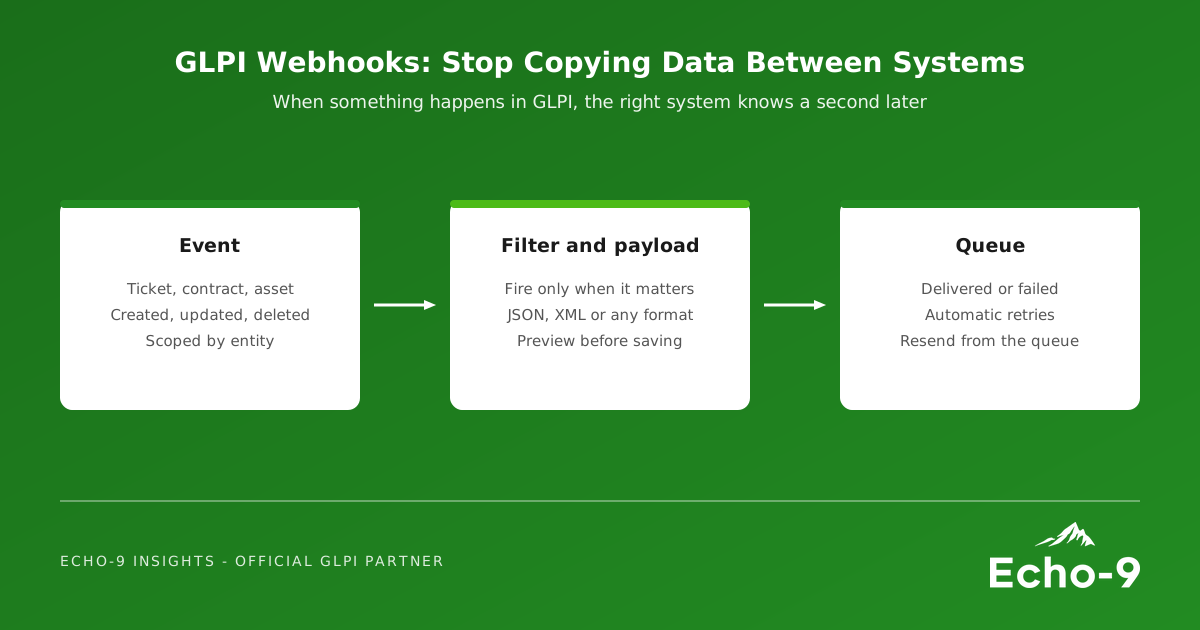
- Trigger. Each webhook has an item type (for example Ticket, User, Computer or Contract), an event (creation, update or deletion) and an entity scope, optionally including child entities.
- Filter. By default a webhook fires for every item of that type. Filters, built with GLPI's standard search engine, restrict it, for example to critical tickets only. A preview shows what would match before you save.
- Payload. A default payload is provided, or you can write your own. Typing
{{opens autocompletion for fields such as the item's ID, name or status. GLPI does not enforce a format: JSON, XML, plain text or anything the receiving system reads. - Queue. Webhooks are queued rather than sent instantly, so the interface stays fast. An automatic action sends them and retries failures (no response, or an HTTP 4xx or 5xx error) up to the number of retries you set. The webhook queue shows what was delivered, what failed and why, and lets you resend.
Where UK organisations use them
Some patterns we see as natural fits:
- Contracts and finance. Notify a finance or procurement system when a contract is created or renewed, so renewals do not live only in IT.
- Major incidents. Post to a Teams or Slack channel when a priority one ticket is opened, so the right people know immediately.
- Assets and security. Tell a security or monitoring platform when a computer is added or retired, so coverage follows the asset register.
- Shared services. Update a partner organisation's system when a ticket that concerns them changes status, without anyone retyping it.
Three things to get right
- Run the queue often. Webhooks are sent by an automatic action. For timely delivery, run automatic actions in CLI mode on a short schedule rather than relying on user traffic.
- Allow internal targets on GLPI 12. GLPI 12 blocks webhooks pointing at internal servers by default to prevent pivot attacks. If your receiving system is on your own network, it must be explicitly authorised.
- Send only what is needed. A custom payload with the fields the receiving system needs is easier to support, and better for data protection, than a full record.
Webhooks or a full integration?
Webhooks are ideal when GLPI needs to tell another system that something happened. When data must flow both ways, or another system needs to create and update tickets, GLPI's High-Level API is the other half of the picture. Many good integrations use both: a webhook to signal the change, and the API to fetch or write the detail.
How Echo-9 helps
Echo-9 designs and builds GLPI integrations for UK organisations, from a single webhook to a complete Integration Pack. We map which events matter, write and test the payloads, set up queue monitoring so failures are noticed, and document the result so your team can maintain it. Where no plugin exists, we build the connector.
If someone in your organisation copies data out of GLPI by hand, there is probably a webhook for that.
Connect GLPI to the rest of your organisation
Tell us which systems you are copying data between, and we will show you what a webhook or API integration would look like.